Monday, September 16, 2013

Our progress across the three terms

This video was a recommendation by my Year 6 students on ways I could assist the new Year 5's or new students when they enter into a 1:1 digital learning environment. The Year 6 students were interviewed earlier on in the year and they felt an orientation movie would help new year 5 students or any new students in gaining an understanding on what was required when they become eligible Netbook / Chrome Book users. There will be a number of orientation movies made next term on Being a Blogger, Looking after the Chrome Book at school and at home and other requirements. This video is on Becoming a Google Account holder. We hope you enjoy it. Orientation movie1 from Joy Paton on Vimeo.
It is evident that all the children in the target can now log into their netbooks independently. At the beginning of term 1, zero students could not do this, but through plenty of practice and opportunities to use their device every day they now log into their netbooks.


 In Term 3, all students in the target group can log into their Google Accounts without the support from others


The skill in opening a Google Document independently was achieved in Term 2 and this has carried on in Term 3. 

The knowledge and skills of filing work under the: Reading, Writing, Maths and Inquiry folders has continued in Term 3. The students made the most progress between terms 1 and 2.

 
 In Term 3, the students made the most progress in being able to share their work with others. Early term 1, the students did not have the experience to share their work with others, but over time their skills have improved. 

 
In Term 3, eight students were able to use Google Spreadsheets independently. This might be due to my Release Teacher using Google Spreadsheets on my class once a week to gather performance data on their Current Events knowledge. 

 
All of the students within my target group are able to use Google Draw independently. This might be due to using Google Draw in Mathematics to show understandings of concepts such as Fractions and Place Value.


The ten students in my target group are now able to use Google Presentations independently. This might be due to the students having more exposure in using Google Presentation for Inquiry, Mathematics and Homework.


There has been gradual progress in students being able to embed these applications independently. More work needs to be done to ensure all the ten students are able to do this confidently.


All of the ten students are able to do this skill independently. Every day these students log into their blogs and post their work.


It is clearly evident that the target group of ten students are able to create new posts independently on their individual blogs. There is an expectation that they are to publish five pieces of learning up on their individual blogs every week.

All of the target group of students are able to insert photographs onto their individual blogs. The students have had plenty of opportunities to insert photographs onto their blogs through screenshots and photograph album links emailed to them.  This skill is used regularly throughout the curriculum areas.


This is pleasing progress with five students able to insert a Vimeo embed code of a movie into a blog post. However, more work needs to be done on this. 


There has been excellent progress between terms 2 and 3 with inserting a photograph from Picasa onto their blogs. Further teacher modelling needs to be done to ensure all students in the target can insert a photo from Picasa onto their blogs.


There has been some progress made with students being able to save a photograph from the internet and upload it onto their blogs. There has been an increase because in term 2 students had to make presentations and flipping eBooks on Past, Present and Future Education. This term they have had the opportunity to create special effect pictures using land form pictures, so there were lots of opportunities to put this skill into practice.


Using a webcam hasn't been a priority during these last three terms. It is difficult with 32 students in the class to use it. I think if we had more space where students could work quietly it maybe used more often in the classroom.


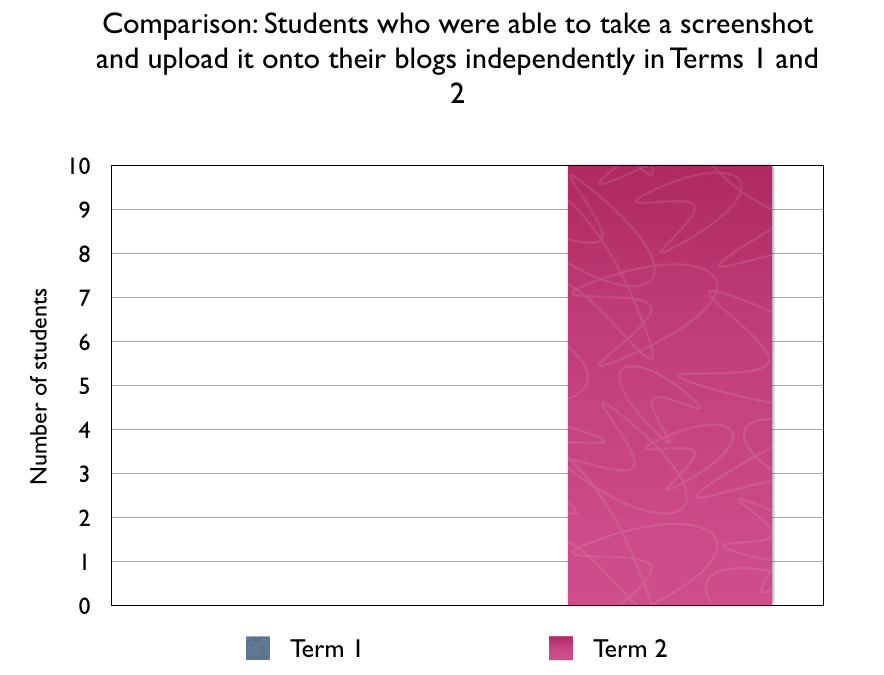
This skill was achieved in Term 2 and has carried through into Term 3. Students take screen shots in the curriculum areas. One of the areas  students take screen shots is Maths. They regularly take screen shots of their progress in Maths Whizz and Xtra Maths. They also write reflections on their learning underneath.


There has been a decrease in term 3 from ten students being able to make comments independently to only nine students being able to make comments independently.


There has been excellent progress made with students being able to write their own reflections on their own learning. Students have had opportunities to write reflection more throughout the year, as they have had Math Whizz weekly results emailed to them, they also take screen shots of their Xtra Maths progress and when we complete any form of art, the students always write a reflections on how well they did. Throughout the year, the students have had plenty of opportunities to reflect on their own learning.


There has been some progress made on students being able to click on bookmarked hyper linked websites. They students can access this book marked sites through the class site. I think the terminology of the word hyperlinked hasn't been explained to the students or class which has resulted in eight out of ten students being able to do this. They naturally do it, when they are on the class site especially when they click on the Topic tab.


There has been an increase of students being able to use these Web 2.0 applications independently in term 3. There has been a shift between terms 2 & 3. Towards the end of  term 2, the students were taught how to use Lucid Charts to make Venn Diagrams. Throughout the year, the students have continually used Popplet. Wall wisher has been used occasionally, but Popplet has been a favourite application to use, as students can embed You Tube clips, images, colour code ideas.


Only nine out of ten students can access the class site. The one student who could not access the class site has a poor level of attendance and his ability is very low. More work in term 4 will be done to ensure he can access the class site independently.


Only five out of ten students can use Google search engines independently. This is due to the teacher having book marked sites for students to visit on the class site. Students have not had opportunities to use Google search engines because a lot of the content on the web is very advanced that when I go on the internet and book mark sites I find websites that the content is at the students level.


There has been some progress made across the terms in being able to put content from the web into their own words. More work needs to be done on this. In term 3, there were a number of lessons where I read about what geysers were from a number of sites. As a whole class the students had to summarise what a geyser was.


There has been steady progress made with students being able to access the class blog independently. There still needs to be more work done in meeting this skill as nine out of ten students were able to do this independently in term 3. The one student who could not access the class blog independently is the same student who has had a lot of time off school.
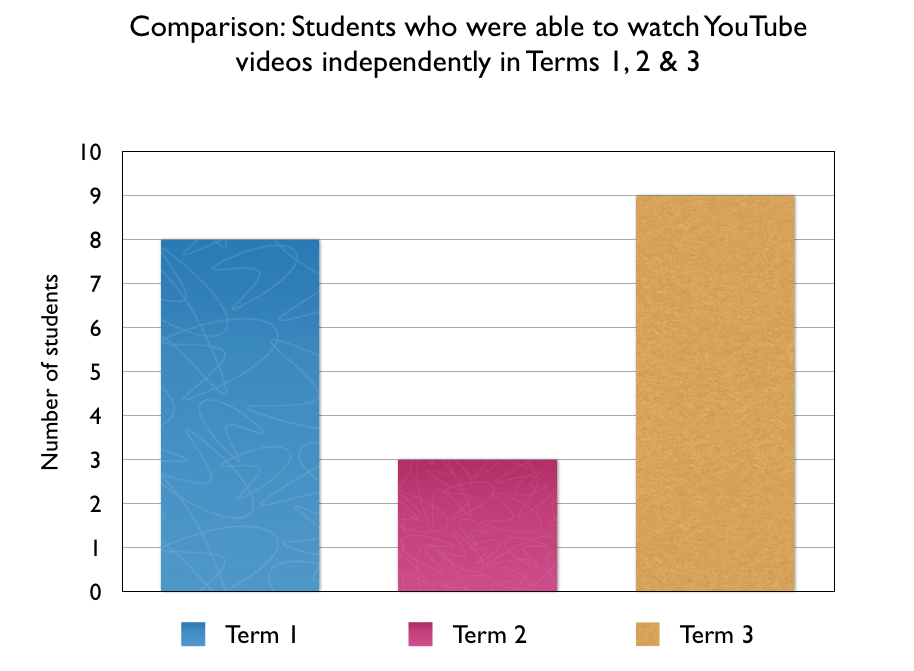


There has been a shift in students being able to watch You Tube video's independently. During term 3, students have done inquiry research on a landform on their choice. You Tube has been encouraged as there is advanced scientific texts on landforms that students would find difficult to understand. Through using You Tube, land forms are explained to the students in a visual format with maybe some animation which would assist them to write reports on their chosen landforms.


There has been great progress with students being able to search for Google images and save them correctly. Throughout the year students have been able to search for images and save them correctly. This has happened more with inquiry topics. In Terms 2 & 3 students have made presentations on Education - Past, Present and Future and Landforms. They have had to search for real images to enhance their presentation.


This is pleasing progress. There have been planned lessons on Smart media, Building smart relationships and Smart Surfing. The remote control on the teacher dashboard has enabled the teacher to view tabs and sites that are open so that students remain safe. Lessons on summarizing content into own words has been taught so that students are not plagiarizing somebody else's work. Cyber Safety is still an ongoing area that needs to be developed further.  

This is very pleasing. The target group know how to care for their Netbook / Chrome book. Over half the target group have had their parents come in and do a training workshop with Courtney and they have been eligible to take their devices home. So far we have had no breakages from these students, which is pleasing.  


Saturday, August 17, 2013

My MITA Learning Journey Presentation

This is presentation of my current research I am doing for the Manaiakalani Innovative Teachers Academy. It is work in progress. This presentation is based around the Teacher as the Inquirer model.

Thursday, May 30, 2013

Comparing students digital learning progress in terms 1 and 2


At the beginning of term 1, there were not any students who could log into their netbooks without the support from other students. This might have been due to students not having a netbook during the time of being interviewed. In term 2, nine out of ten students were able to log into their netbooks independently. One out ten students could not as her parent has recently signed up for a Chrome Book and at the time of initially setting her up with her Chrome Book, we found out that we have run out of licenses. This problem is being addressed and when she is questioned in term 3, she would be able to log into her Chrome book independently.

 
In term 2, ten out of ten students are able to open a Google Document independently. At the start of term 1, only three students could open a Google Document independently. This goes to show that it is important to run an orientation programme for the new upcoming Year 5 students who are currently in Year 4, in learning to use Google Applications and other digital tools.

 
In term 2, there are ten out of ten students who know how to file their learning under the folders: Reading, Writing, Maths and Inquiry. This is an improvement, compared to term 1 where only three out ten students could do this independently. One of the variables could be that those three students could have had more practice opportunities at filing work, as their parents could signed up for netbooks / Chrome books earlier than the other students.   


At the start of Term 1, only two out ten students could log into their blogs independently.  Over time there has been an increase within the number of students who are now able to log into their blogs independently, without the support from other students.


 At the beginning of term 1 only one student could create a blog post independently. At the start of term 2, all ten students were able to do this. This is down to students having a netbook to use and having maximum practice opportunities to fulfil this requirement.


At the start of the year, the upcoming Year 5 students did not know how to fill out the blog post requirements. This is due to the class blog being managed and administered by the teacher last year. Since the students have entered into their new digital learning learning environment they are the authors to their own individual and have learnt very quickly how to fill out the blog post requirements.


At the start of the year students did not know how to insert a photograph onto their blogs. In term two, nine out of ten students can insert photographs independently. One of the reasons for the increase is that photographs of student learning are taken regularly and are either emailed to the student or put on Picasa for the student to access.


In Term 1, children were only exposed to movie making once. They were filmed on their Inquiry Learning presentations. Each movie went through Vimeo and the embed code was emailed to them. As this was a gradual process, not all students were taught this. Also the Teacher's laptop's hard drive failed in the midst of this process and the laptop was sent away. This is a goal for term 2.


In term 1, zero out of ten students could not independently insert a photograph from Picasa onto their blogs. Three out of ten students are now able to do this independently. This could be due to that a lot of photographs were taken from my iPad and were emailed to students individually, while my laptop was being serviced. Last term students were only given 2-3 opportunities to access class photographs from Picasa.

In term 1, there were not any students who could insert movies independently onto their blogs. In term 2, only three students could do this. This is due to the fact that these students have only had one practice opportunity to do this. Further work needs to be done to ensure every students can insert movies independently onto their blogs.


klhjlkj


Last term, there wasn't a need for students to use their webcams on their netbooks. The webcam works well if the students were in a quiet room. It is awkward when there are other 33 students in the class. Hopefully this term students would be able to use their webcams without any uploading issues.


At the beginning of term 1, there weren't any students who could take a screenshot independently and upload it onto their blogs. In term 2, ten out of ten students are now able to take a screenshot and upload it onto their blogs. During the term, students have been enrolled to do online programmes such as Study Ladder, Maths Whizz and Xtra Maths. These students have been encouraged to take screen shots of their progress and to upload it onto their blogs and to write a reflective statement.


In term 1, only six students were able to comment to others. This was due to having some experience in online commenting last year. In term 2, ten out ten students were able to comment to others. This is due to students being given practice opportunities. Making comments to others is used as independent learning activity for when I am working with groups in Reading and is used as a homework task to comment on the blog of the week assembly item.


At the start of term 1, only one student was able to reflect on their own learning. Since then students have been given opportunities to critically reflect in Art, Topic and in Maths. 


In term 1, the students had no experience in using hyperlinked websites. In term 2, only two students claim that they could do this independently. As a teacher, I know they have all had experience clicking on hyperlinked sites from my class site, yet this has not been emphasized to them. I feel I need to explain more to them what hyperlinking is and perhaps getting them to create a hyperlink on one of their blog posts. Seeing is believing and there's nothing like breaking the language down for them.


At the start of term 1, there were not any students who had experience using Wall wisher, Popplet and Lucid charts. Therefore they could not use these applications independently. At the start of term 2, only four students could use Popplet, Wallwisher and Lucid charts independently. More work needs to be done in this area. When these web 2.0 tools were demonstrated in term 1, not all of these students had signed up to their netbooks or Chrome Books which delayed learning. If they were to use the class computers they would then be grouped and normally one person within the group would take over the learning leaving the other member with very little hands on learning.


At the start of term 1, there weren't any students who could access the class site. Through showing the class where to go, nine out ten students are able to access the class site. The class site is being used more and more, for students to access reading follow up work, maths links, reflection activities and homework tasks.

In term 1, there were not any students who could use Google search engines. In term 2, only two students were able to use Google search engines. There are many variables to this. I think the main variable is that I tend to create hyperlinked pages for students to access specific web sites on my class site. My reason for this is that I want students to be able to access content which they would be able to read and understand. Last term, we studied war and conflict. If I got my class to search World War 1, they would find content that would be above their understanding. This would lose a lot of class time and the internet is so broad that it would like giving my children a million books to look at on this subject. 


In term 1, only one student could do this and in term 2, only two students could do this. This is an ongoing goal and is work in progress. At times the content off the net is not at the students reading age level, which makes it challenging for the students to understand the main ideas. This goal is also tied into the guided reading program, where students are taught to summarize passages of a text and are encouraged to retell texts in their own words.


At the start of term 1, only one student could access their individual blog at home or anywhere. In term 2, only five students could do this independently. One of the variables that need to be taken into consideration is those who are eligible to take their netbooks home. Those year 5 students who are eligible would have more practice opportunities with accessing their individual blogs after hours than those who are ineligible. Also another variable would be whether the five students who were interviewed have internet access at home. If they do then this would also make a difference students would be able to show their parents their individual blogs and updates more regularly.

At the start of term 1, only six student were able to visit the class blog independently. A reason for this is that some of the Year 5 students were taught by me as Year 2's and worked from the same blog. Also the blog is shared in blog of the week presentation in assemblies. In term 2, ten out of ten could visit the class independently. This might be due to students work being uploaded onto the class blog every week. Also a lot of the photographs of whole class activities are made into presentations and are uploaded onto the class blog, which makes it a fun site to visit.


In the beginning of term one there were not any students who could check their emails independently. In term 2, nine out ten students could check their emails independently. During this last term, students have had Maths Whizz progress photographs emailed to them, Maths photos emailed to them and art photo's emailed to them. Students have had plenty of practice opportunities to access their emails and to upload email content onto their blogs.


This was a very interesting response I got from the students. Eight of ten students watched You Tube videos independently, yet in term 2 only three of ten watched You Tube videos independently. Obviously there is a decline of You Tube watchers in the Year 5 group. This could be due to the students being exposed to other forms of digital learning such as blogs, Google Apps and other Web 2.0 tools that they are focused on these tools. Also they have had the legalities explained to them about creating accounts for social network sites.


This is still work in progress. In term 1, I wanted the students to concentrate on using Google Apps and Blogger successfully. I can see You Tube videos would have a lot of potential at the end of a student presentation or in a Popplet in presentation. This can be taught later in the year.

In term 1, one out ten students were able to search and save Google images successfully. In term 2, five out of ten students were able to do this. One of the reasons for the increased number was that back in term 1, the students had the opportunity to make a presentation on a chosen war and conflict. As part of their learning they had to find legal images that they could save and upload onto their presentation. Five students within this group could not do this independently and had to rely off the Manaiakalani Teacher Aide and Year 6 students to help them throughout this process.


More work needs to be done in this area. It is work in progress. At present students are learning about Smart Media and Smart Footprints. Lessons and awareness clips are on the class site. Hopefully by term 3, there would be an increase of students who know to be a Cyber Smart Learner and would have knowledge in this area.

In Term 1, only three out of ten students know how to care for their Netbooks / Chrome Books. In term 2, nine out ten students knew how to care for their netbooks independently. This might be due to having parents going through the parent training and for eligible students to take their netbooks home. Also I spend time going over ways students need to care for their netbook / chromebooks and go over conditions around repairs, warranties and insurance matters.